
Dear Vasili,
I’m writing with a request for some clarification regarding loading custom IR simulations for amplifiers and cabinets to BeastBox.
Could you please explain how third-party or custom IR simulations should be prepared?
What file format should they be in?
Do the files need to follow a specific naming convention?
Should they be placed in particular folders?
Additionally, is it possible to load custom IRs directly into the device and replace the “standard” factory ones, or can they only be used via the SD card option?
Thank you in advance for your help.
BeastBox - own Amp&Cabs IRs

Re: BeastBox - own Amp&Cabs IRs
Hi!Pietrek6 wrote: 04 Jan 2026, 22:13 Could you please explain how third-party or custom IR simulations should be prepared?
What file format should they be in?
Do the files need to follow a specific naming convention?
Should they be placed in particular folders?
Additionally, is it possible to load custom IRs directly into the device and replace the “standard” factory ones, or can they only be used via the SD card option?
- The IR files should be in WAV format, 24-bit, 48 kHz, with no extra junk in data
- The file names don't matter
- Each folder in the BeastBox internal memory or external SD card should contain only one IR file
- You can replace the IR files stored in the preamp's internal memory with any other files in the proper format
Take care,
Vasili
Vasili
Re: BeastBox - own Amp&Cabs IRs
Okay, thank You for response. How do I install the new IR files? I connect the Beastbox via USB, but the memory is empty.
The button on the right seems to toggle insertion, but where do I drop the files?
The button on the right seems to toggle insertion, but where do I drop the files?
Re: BeastBox - own Amp&Cabs IRs
Hi!Pietrek6 wrote: 05 Jan 2026, 17:25 Okay, thank You for response. How do I install the new IR files? I connect the Beastbox via USB, but the memory is empty.
The button on the right seems to toggle insertion, but where do I drop the files?
- Connect the Beastbox to your PC or Mac using a USB-C cable
- The preamp should appear in your system as a regular flash drive labeled BEASTBOX
- In the root directory, there should be two folders: Amp and Cab. If they're not there, create them
- Inside each of these folders, you need subfolders named 01, 02, 03, 04
- Place one IR file in the correct format into each of these subfolders
Take care,
Vasili
Vasili
Re: BeastBox - own Amp&Cabs IRs
So the flash was empty. I created 2 folders Amp and Cab with subfolders 01, 02 ,03 ,04.
But not working, could you please check img below?
Could you please upload the original files so that I can reinstall them and restore the device to its original factory state?
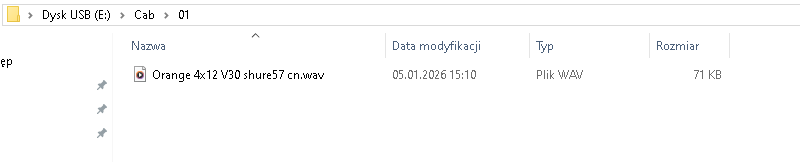
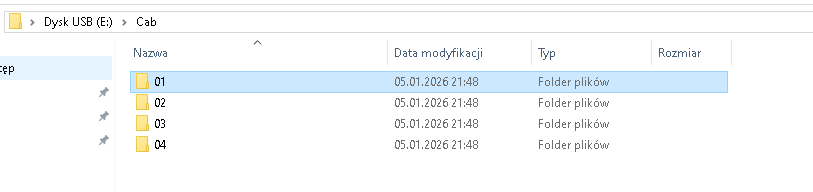
But not working, could you please check img below?
Could you please upload the original files so that I can reinstall them and restore the device to its original factory state?
Re: BeastBox - own Amp&Cabs IRs
Oh, my apologies, 01...04 are the folder names for the Colossus.Pietrek6 wrote: 06 Jan 2026, 00:14 So the flash was empty. I created 2 folders Amp and Cab with subfolders 01, 02 ,03 ,04.
But not working, could you please check img below?
Could you please upload the original files so that I can reinstall them and restore the device to its original factory state?
For the Beastbox, rename them to A1...A4 for Amp and C1...C4 for Cab.
Take care,
Vasili
Vasili
Re: BeastBox - own Amp&Cabs IRs
Thanks, after changing the name it started working.Vasili wrote: 06 Jan 2026, 00:23Oh, my apologies, 01...04 are the folder names for the Colossus.Pietrek6 wrote: 06 Jan 2026, 00:14 So the flash was empty. I created 2 folders Amp and Cab with subfolders 01, 02 ,03 ,04.
But not working, could you please check img below?
Could you please upload the original files so that I can reinstall them and restore the device to its original factory state?
For the Beastbox, rename them to A1...A4 for Amp and C1...C4 for Cab.
What format should the Amp Sims be in? Also wav? And do you have any tips on where to download them?
Re: BeastBox - own Amp&Cabs IRs
Hi! Beastbox IRs are available by the following link:Pietrek6 wrote: 06 Jan 2026, 00:39 Thanks, after changing the name it started working.
What format should the Amp Sims be in? Also wav? And do you have any tips on where to download them?
cloud/beastbox/ir/
Take care,
Vasili
Vasili
Re: BeastBox - own Amp&Cabs IRs
Thank you very much for sharing the files.Vasili wrote: 12 Jan 2026, 14:10Hi! Beastbox IRs are available by the following link:Pietrek6 wrote: 06 Jan 2026, 00:39 Thanks, after changing the name it started working.
What format should the Amp Sims be in? Also wav? And do you have any tips on where to download them?
kartakou/IR/BeastBox/
Everything works exactly as it should now.
To clarify, the files were removed by mistake on my side, so thanks again for re-uploading them. This is exactly the advantage of smaller creators — there is real, direct support and the possibility to resolve things quickly.
I also tested external IRs, and they work great with the BestBox, so the possibilities are basically unlimited. I’m really looking forward to other products from your lineup, because it’s clear that a lot of care and passion goes into them.